Owner
- One record per home that stays with the company
- Overdue actions and follow-ups in one workday queue
- Visit reports that keep the job as it stood that day
FOR HOME SERVICE COMPANIES
ForeBot keeps each home as a 3D model you can look through: what was seen, what was reported, what still needs tracing. Every job starts from that record.
Runs in the browser. Nothing to install.
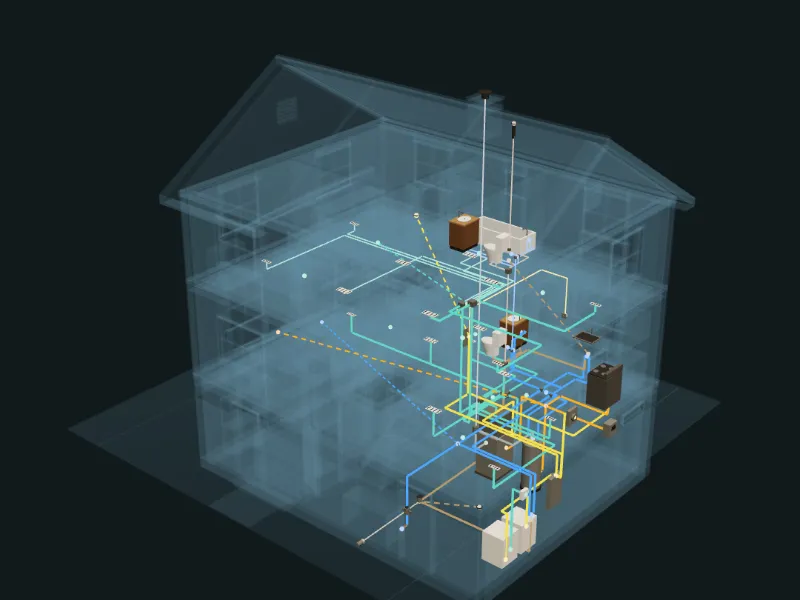
THE HOME MODEL
Most of what goes wrong on a visit is behind a wall or in someone’s memory. The model puts what is known in one place, and shows what is not.
Water, drains, gas, power, air and heat in one model you can turn, cut by floor and open on a phone.
A solid run was seen in the source. A thin run was drawn or reported. A dashed run is not confirmed, and a link with no recorded route is never drawn through a wall.
Pick a unit or a valve and follow what the record connects. The trace stops where the record does, and says so.
The record counts the questions it can answer. Each open one can go on a job as the next thing to trace on site.
This is a model of what was recorded. It is not a complete map of concealed services.
THE PREPARED JOB
ForeBot turns a customer’s words into a prepared job on that one record: what to ask, what to bring, what to check first.
“Upstairs bedrooms go cold overnight. The furnace tries to light, then shuts off.”Original complaint · customer’s words
Gas furnace, attic · nameplate photo and manual on file
What to ask, what to bring and what to check first
0.9µA flame signal
ONE CALL, BEFORE AND AFTER
Most calls arrive as a name, an address and a sentence. Here is what ForeBot makes of that sentence.
The customer said
“Upstairs bedrooms go cold overnight. The furnace tries to light, then shuts off.”
Illustrative call
The prepared job
Furnace not heating or locked outClosest field guide · IllustrativeStop ruleYou smell gas: leave the building now. From outside, call emergency services or the gas utility.
General prompts from a field guide, not findings from this home. The technician decides what to do.
HOW THE DAY WORKS
Type what the customer says. If the words touch a safety risk, ForeBot shows the question to ask first. Then it shows the closest field guide, or says that none fits.
Open the job from the guide. The questions, the packing list and the first checks go with it, marked as general prompts and not findings from this site.
Add notes, readings and photos to the job. Notes and readings made without signal stay on the device and are sent when signal returns.
Seal a visit report that keeps the job as it stood that day, and date a follow-up to ask whether the fix held.
WHY OWNERS CARE
The truck arrives without the question or the tool that mattered.
Each job starts with what to ask, what to bring and what to check first, before anyone leaves the shop.
The fix did not hold, and you hear about it from the customer.
A dated follow-up asks first. A callback stays in the queue until a visit report says it was addressed.
What a good technician knows about a home goes with them when they go.
Equipment, readings, photos, manuals and reports stay with the property, not in someone’s head or truck.
The customer and the company remember the visit differently.
The original words and a sealed report show what was reported and when. A correction is added, never written over.
BY ROLE
THE RECORD
Everything in it is reported by the people doing the work. ForeBot keeps what was reported apart from what was measured, and says what is still unknown.
The customer’s words and the first observation are kept as written. A correction is a new entry.
Each correction to a unit’s details is a new revision. A past visit keeps the details it used.
Job photos, manuals and invoices stay with the property and the visit they belong to.
A sealed report keeps the job as it stood that day, with the reported outcome and any callback it addresses.
AI, PLAINLY
ForeBot is built so that no one AI company holds your work. Homes, jobs and evidence stay in ForeBot, under your account, whichever model you use.
Open nowYour AI assistant can read the field guides today, with no account. Connect it
Not yetAI is not connected to customer accounts today. The field guides and the record work without it.
FOREBOT COMMERCIAL · IN DEVELOPMENT
For providers who run work across many sites, contracts and subcontractors. One record per job, so work gets billed, proof gets found and bills get matched. It replaces nothing you run.
See ForeBot CommercialROADMAP
Items marked Live are in every workspace today. Private preview items work today for the homes we load with you.
Properties, jobs, the customer’s own words, readings, equipment revisions, photos, documents, visit reports and follow-ups.
A safety question when the words call for one, the closest field guide and a prepared job from the customer’s words.
Notes and readings made without signal wait on the device and are sent when it returns.
A 3D model of a home with each recorded system where it runs and what still needs tracing. Explore the sample now. During the preview, a real home is loaded with us and opens in your own workspace.
Bring a workspace to the assistant you choose. It is not connected to accounts yet.
One record per job across contract, work order, proof and accounting, for facility-services providers.
A phone walkthrough that builds the model, and step-by-step procedures for the exact unit.
QUESTIONS
A 3D model of one home with its recorded systems drawn where they run, and each connection marked as seen, reported or not confirmed. It is a model of what was recorded. It is not a complete map of concealed services.
Only the account it belongs to. The model files are private, are never public links, and are removed with the account.
There is no billing during the private preview. Plans are discussed on a demo.
Ask for it with the form at the end of this page. Anyone can try the example workspace right now.
Not yet. During the private preview a workspace belongs to one sign-in. Tell us how your team works when you book a demo.
No. A field guide is matched on the customer’s words, so a match means the words are similar, not that ForeBot found the fault. Its questions and checks are general prompts. A qualified person makes every call, and ForeBot never authorizes physical work.
No. Your records live in ForeBot, not inside any one assistant. AI is not connected to customer accounts yet. The aim is that you choose the model and can change your mind.
You. Each workspace is private to its account. There are no ads and no trackers, and the example workspace runs entirely in your browser and saves nothing.
No. ForeBot runs in the browser on a computer, tablet or phone.
PRIVATE PREVIEW
Tell us about your company. A person reads every request and replies by email to find a time. There is no billing during the private preview.
Or try the live example first